

One-click payments with Klarna Web SDK (Solidgate orchestrated)
Charge a returning customer's saved Klarna option in a one-click, customer-initiated transaction using the Klarna Web SDK, where Solidgate orchestrates the charge. Restore the saved option from the Klarna Customer Token, present Saved and Pick plan, and charge through Solidgate.
7 min read
This guide explains how to charge a returning customer's saved Klarna option in a one-click, customer-initiated transaction using the Klarna Web SDK, where you present Klarna in your own checkout and Solidgate orchestrates the charge. The customer is at checkout and has a stored Klarna Customer Token, so Klarna can be pre-selected as a one-click "Saved" option.
You restore the saved option from the Klarna Customer Token before presenting, then charge through Solidgate: because Solidgate initiates the charge, the charge is authorized on the Solidgate token — Solidgate's own token identifier, which it maps server-side to the Klarna Customer Token it holds. You still present the saved option with the Klarna Customer Token, but the Solidgate token carries the charge. You never call Klarna's authorize yourself. Klarna may still require a step-up based on risk; when it does, the Web SDK guides the customer through a short Klarna Purchase Journey before Solidgate authorizes the charge.
Full Web SDK setup
For the full Web SDK setup (loading the SDK, rendering the payment selector, button styling), follow Build checkout form with Klarna Web SDK (Solidgate orchestrated). This page covers only the saved-option specifics. To compare all tokenized flows, see the Tokenized payments overview.
Prerequisites
Before you integrate, check that you meet the following prerequisites:
- 1.Ensure that you have Klarna enabled with Solidgate.
- 2.A stored Solidgate token for the customer — Solidgate's own token identifier that authorizes the charge — and a Klarna Customer Token issued with the
payment:customer_scope to present the saved option (see Create a Klarna Customer Token).present - 3.Confirm you have access to the Klarna Partner Portal with a client identifier (domain allowlisted) and an API key able to generate a Klarna Network Session Token.
- 4.Add Terms and Conditions covering saved payment methods.
Integration overview
- 1.Generate a Klarna Network Session Token from the stored Klarna Customer Token.
- 2.Initialize the Klarna Web SDK with the Klarna Network Session Token and request the payment presentation — Klarna returns the customer's saved option with a
PRESELECT_instruction.KLARNA - 3.Render Saved (pre-selected) and Pick plan in your payment selector.
- 4.The customer selects the saved option; the
initiatecallback returns theklarnaNetworkSessionTokenand thepaymentOptionId. - 5.Charge through Solidgate, passing the Solidgate token, the
klarnaNetworkSessionToken, and thepaymentOptionIdinklarna_.network_ data - 6.Solidgate resolves the Solidgate token to the Klarna Customer Token and authorizes the charge with Klarna behind the scenes.
- 7.If customer authentication is required, Solidgate returns a
payment_. Forward it to the Klarna Web SDK, which launches the Klarna Purchase Journey; once the customer completes it, Solidgate finalizes the charge.request_ url - 8.When the charge completes, Solidgate sends an order completed notification — show the order confirmation and record the successful charge.
sequenceDiagram
autonumber
participant C as Customer
participant P as Partner
participant K as Klarna
participant AP as Solidgate
C->>P: Visits checkout page
P->>K: Generate Klarna Network Session Token<br/>POST network/session/tokens
Note over P,K: Header: Klarna-Customer-Token
K-->>P: Return klarna_network_session_token
P->>K: Initialize Klarna Web SDK
Note over P,K: klarnaNetworkSessionToken
K-->>P: Return payment methods and instruction
P->>P: Display Klarna payment methods
C->>P: Click Klarna payment button
K->>P: Trigger initiate callback
Note over K,P: (new) klarna_network_session_token<br/>paymentOptionId
P->>AP: Create payment
Note over P,AP: Solidgate token<br/>(new) klarna_network_session_token<br/>klarna_network_data: payment_option_id
alt If customer authentication is required
AP-->>P: Return payment_request_url
P->>K: Forward payment_request_url to Klarna Web SDK
K->>C: Launch Klarna purchase journey
C->>K: Complete Klarna purchase journey
end
AP-->>P: Order completed notification
P-->>C: Display confirmation message
Integration details
- 1.Generate a Klarna Network Session Token from the Klarna Customer Token. Before initializing the Web SDK, call the Generate Klarna Network Session Token endpoint server-side (
POST /) with the stored Klarna Customer Token in thev2/ network/ session/ tokens Klarna-Customer-Tokenheader. The returned Klarna Network Session Token carries the customer's saved Klarna context and is directly Web SDK-compatible. - 2.Initialize the Web SDK with the Klarna Network Session Token so the payment presentation returns the saved option.
- 3.Render the saved option. With a Klarna Customer Token context present, the presentation returns a
savedPaymentOption(in addition to the defaultpaymentOption) with thePRESELECT_instruction. Render the Saved option before the default option and pre-select it; the default option becomes the Pick plan entry.KLARNA
Customer token required to present
The Klarna Customer Token is required to present the saved option. Use it to generate a Klarna Network Session Token via
generateKlarnaNetworkSessionToken. The Klarna Customer Token is a durable credential — generating a session token does not consume it, so you can reuse it to generate more.Chain session token from Boost
If you already hold a Klarna Network Session Token obtained when the customer interacted with a Boost feature (for example On-site messaging or Sign in with Klarna) earlier in the checkout, chain it: call
generateKlarnaNetworkSessionToken with both that session token in the Klarna-Network-Session-Token header and the Klarna Customer Token in the Klarna-Customer-Token header. The returned session token is what you use to initialize the SDK, preserving session continuity across the checkout.The recommended presentation when a Klarna Customer Token is available:
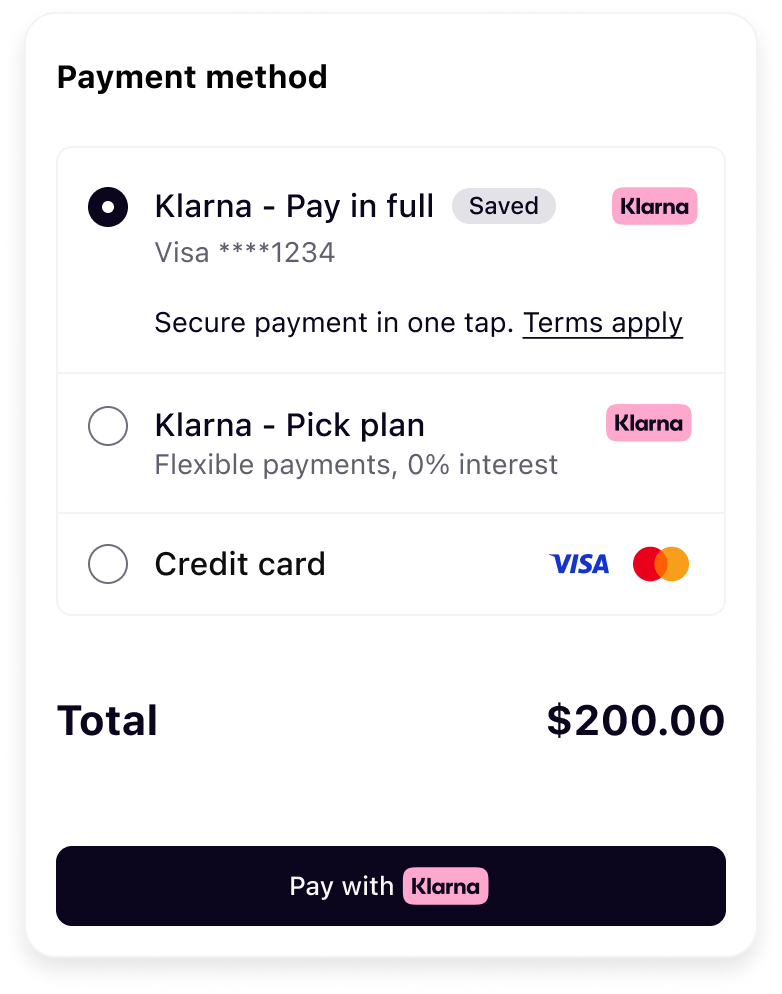 | 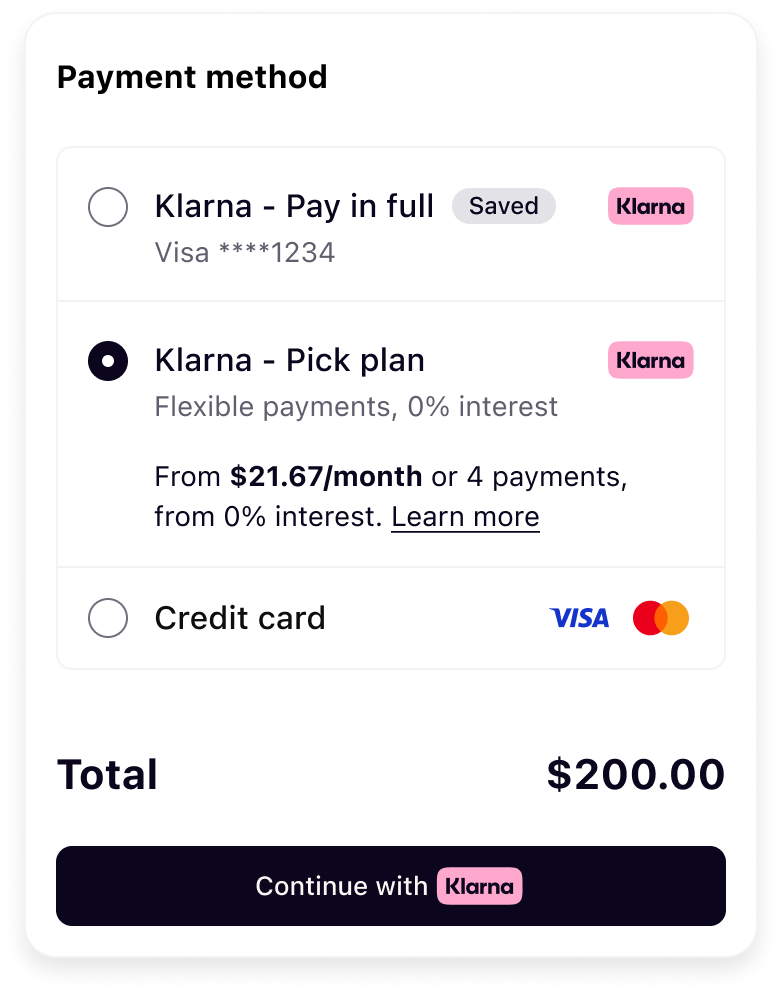 |
| Saved Klarna option (pre-selected) | Pick Plan selected |
Prioritize the
savedPaymentOption by placing it before the default paymentOption. Pre-select it on PRESELECT_, and show it as the only option on SHOW_.JAVASCRIPT
1
2
3
4
5
6
7
8
9
10
function renderKlarna(paymentPresentation) {
const { paymentOption, savedPaymentOption, instruction } = paymentPresentation;
// Render the saved option first (Saved), then the default option (Pick plan)
if (savedPaymentOption) renderKlarnaOption("klarna-option-saved", savedPaymentOption);
if (paymentOption) renderKlarnaOption("klarna-option-default", paymentOption);
const primaryId = savedPaymentOption ? "klarna-option-saved" : "klarna-option-default";
if (instruction === "PRESELECT_KLARNA" || instruction === "SHOW_ONLY_KLARNA") {When the customer selects the saved option, the
initiate callback returns the klarnaNetworkSessionToken and the paymentOptionId. You charge Solidgate directly to finalize the payment.| Field | Presence | Description |
|---|---|---|
| Charge credential | required | The Solidgate token — Solidgate's own token identifier. Because Solidgate initiates the charge, the charge is authorized on the Solidgate token; Solidgate resolves it server-side to the klarna_. |
klarnaNetworkSessionToken | required | The session token returned by the initiate callback. |
klarna_ | required | Array carrying the selected paymentOptionId — "[paymentOptionId, .. Mandatory to charge the saved one-click option. |
BASH
1
2
3
4
5
6
7
8
9
10
curl -X POST https://api.acquiring-partner.com/payment \
  -H "Content-Type: application/json" \
  -d '{
    "amount": 1000,
    "currency": "USD",
    "payment_methods": {
      "klarna": {
        "<acquiring-partner token>": "",
        "klarna_network_session_token": "",
"klarna_network_data": "[paymentOptionId, ...]"Solidgate resolves the Solidgate token to the
klarna_ and authorizes the charge with Klarna behind the scenes. Refer to Solidgate's API reference for the exact field names and response contract.| Outcome | What it means | Next step |
|---|---|---|
| Order completed | Klarna authorized the charge and Solidgate sends an order completed notification. | Display the confirmation page and record the successful charge. |
| Declined | Klarna did not authorize the charge. | Surface a retry/alternative payment to the customer. |
| Authentication required | Klarna needs the customer to complete a short Klarna Purchase Journey before the charge can be finalized; Solidgate returns a payment_. | Forward the payment_ to the Klarna Web SDK to launch the Klarna Purchase Journey. Once the customer completes it, Solidgate finalizes the charge and sends the order completed notification. |
Integration requirement
A saved-option one-click charge often completes directly, but Klarna may require customer authentication based on risk — handle the authentication-required outcome above so the customer can complete the Klarna Purchase Journey. If you instead present Klarna as a one-time payment (no Klarna Customer Token), follow Build checkout form with Klarna Web SDK (Solidgate orchestrated).
Related articles
Jump to section...