

On-site Messaging for React Native
Enable Klarna Payment messaging on your online store with Klarna's Mobile SDK and boost transparency and conversion. This includes our pre-qualification feature, which allows customers to check their eligibility for Klarna financing before completing a payment request. This reduces friction and increases confidence, as customers know their options upfront.
8 min read
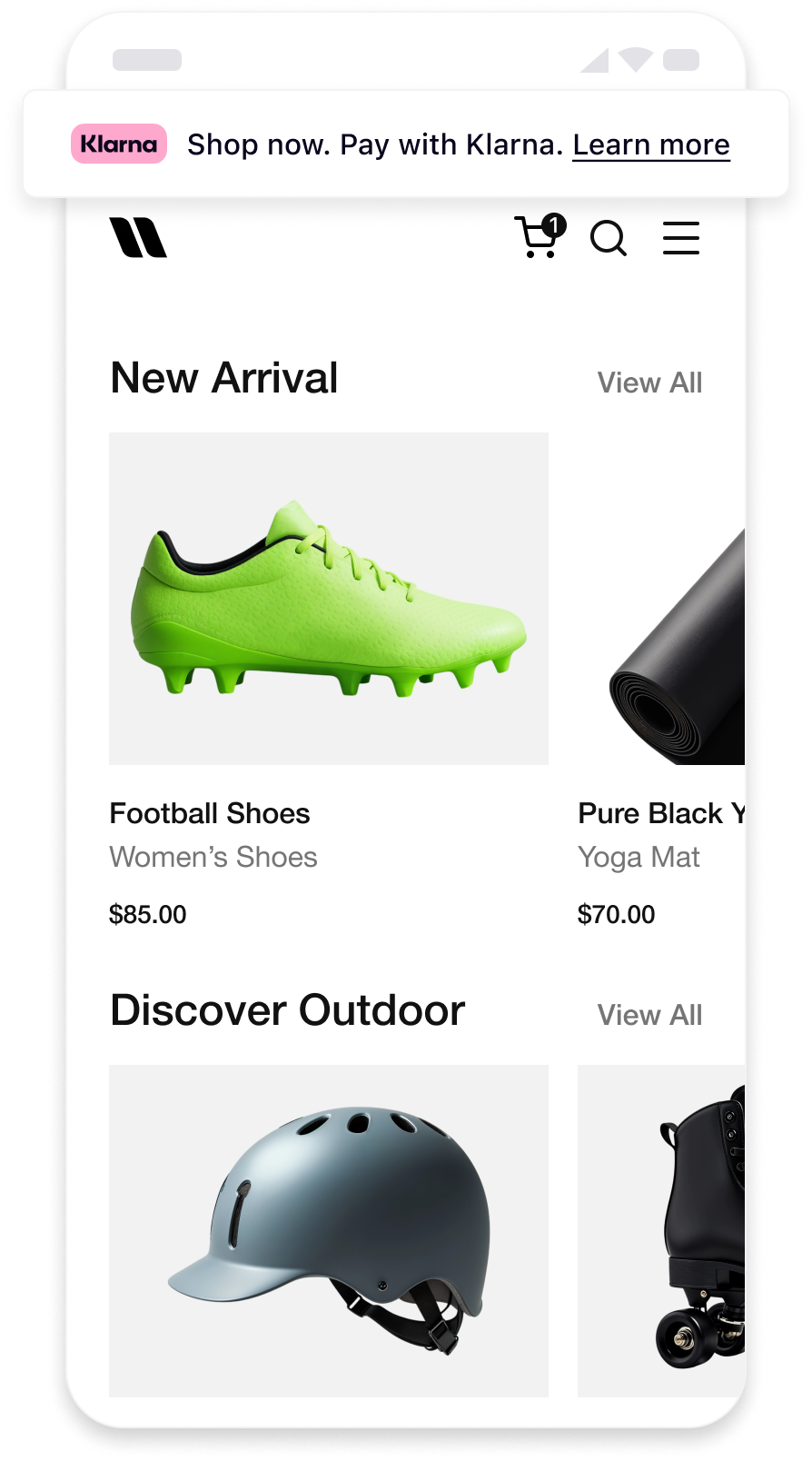 | 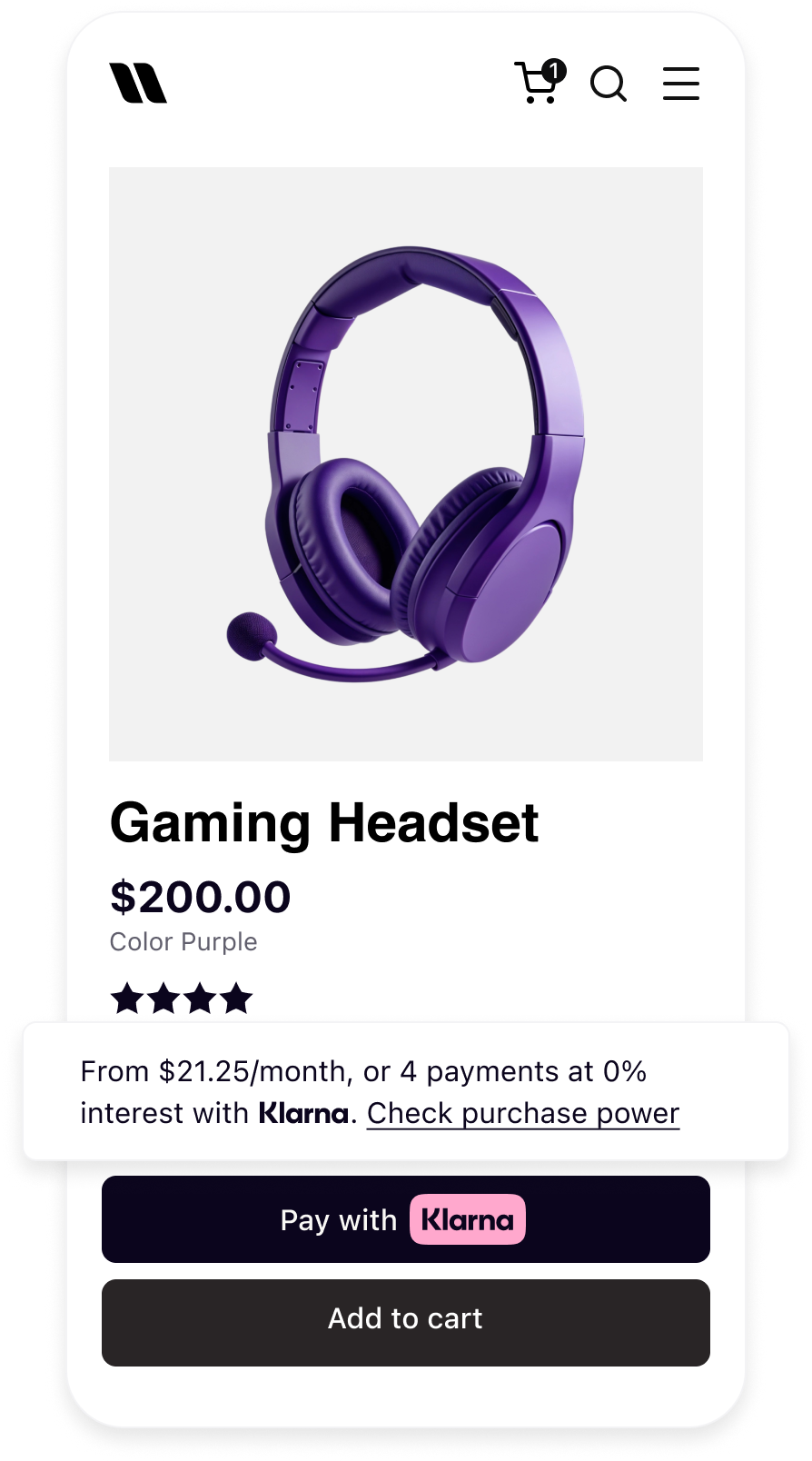 | 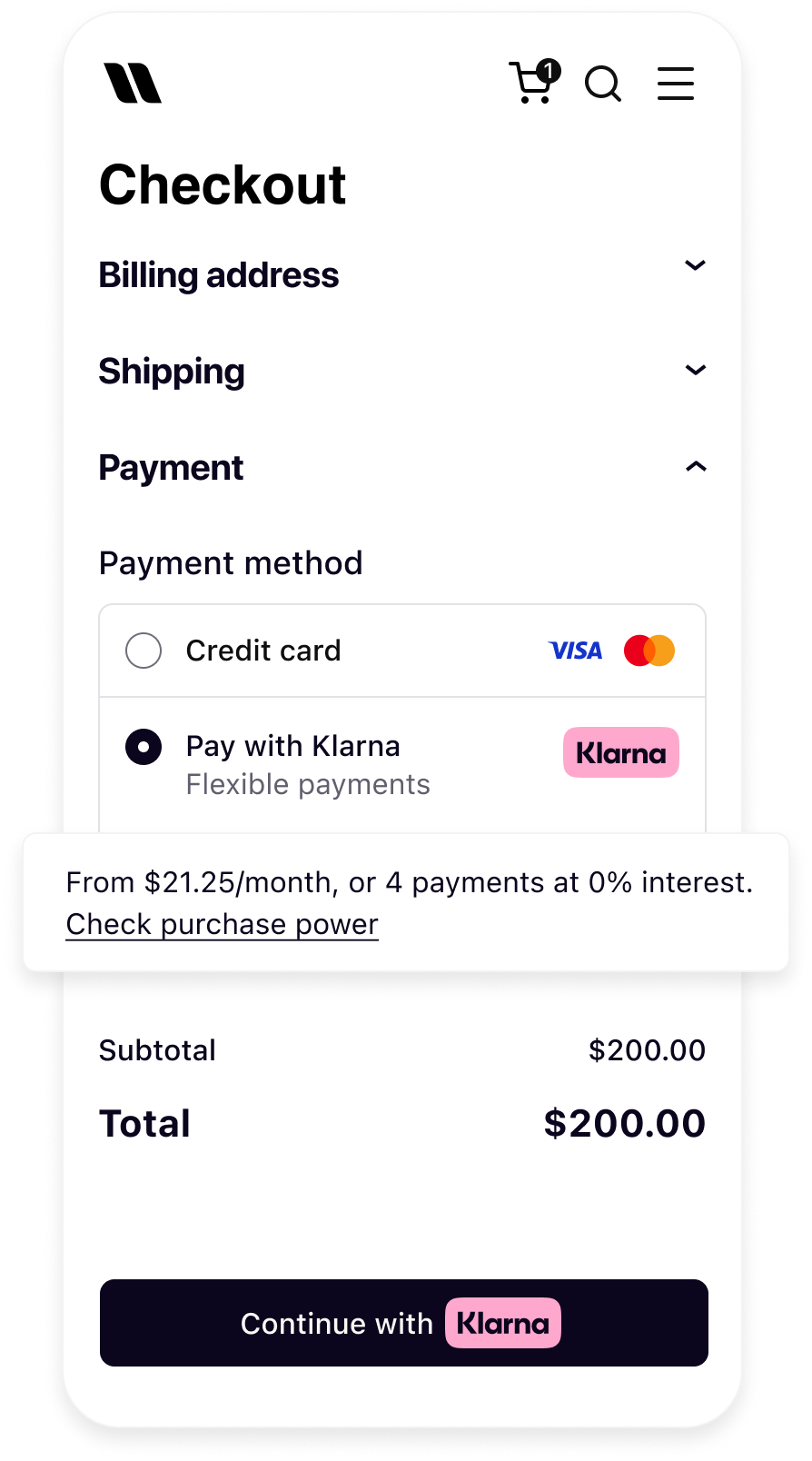 |
| Messaging on the homepage | Messaging on the product detail page | Messaging in the checkout |
Before you integrate On-site messaging, please check that you meet the following conditions:
- 1.Ensure that you have Klarna enabled.
- 2.Confirm you have access to the Klarna Portal.
- 3.Inside Klarna Portal:
- 3.1.Confirm that you have generated a client identifier with your domain URL allowlisted.
- 3.2.Confirm that you have generated an API key.
- 4.Your project meets the minimum platform requirements:
- 4.1.React Native ≥ 0.57
- 4.2.iOS 10 or later
- 4.3.Android 4.4 (API 19) or later
- 4.4.Node.js ≥ 16
Adding On-Site Messaging to your native app is a straightforward process. At a high level, to achieve this tailored experience for your users, you will need to follow these steps:
- Request access to On-Site Messaging.
- Install the
react-native-klarna-inapp-sdknpm package. - Complete platform-specific setup (Android Maven repo, iOS CocoaPods).
- Add the
KlarnaOSMViewcomponent to your screen and provide the required props.
sequenceDiagram
participant C as Customer
participant P as Partner
participant K as Klarna
participant AP as Acquiring Partner
P->>K: Initialize Klarna SDK
P->>K: Get OSM placement
K->>P: Return messaging/prequalification content
P->>C: Display messaging/prequalification content
alt Prequalification flow - Approved
C->>P: Clicks to check purchase power
P->>K: Create session ID & request interoperability token
K->>P: Return session ID & interoperability token
K->>C: Start prequalification journey
C->>K: Completes prequalification
K->>P: Send approval event & updated messaging
K->>C: Update placement to show approval
alt Partner builds checkout form
K->>P: Prequalification state preserved
else Checkout form via Acquiring Partner
P->>K: Fetch interoperability token
P->>AP: Share interoperability token
end
end
BASH
1
2
npm install react-native-klarna-inapp-sdk --save
BASH
1
2
yarn add react-native-klarna-inapp-sdk
Check latest npm release
Check the npm package page for the latest release.
The Android integration depends on the native Klarna Mobile SDK hosted on Klarna's Maven repository. Add the repository to your app's
android/build.gradle:GROOVY
1
2
3
4
5
6
7
8
9
10
allprojects {
    repositories {
        // ... existing repositories ...

        maven {
            url 'https://x.klarnacdn.net/mobile-sdk/'
        }
    }
}
Install the CocoaPods dependencies:
SWIFT
1
2
cd ios && pod install
No additional configuration is required. The podspec in
react-native-klarna-inapp-sdk automatically pulls the correct native iOS SDK.React native SDK version pinning
The React Native wrapper pins compatible native SDK versions. See the Mobile SDK versioning policy for details on version compatibility.
Import
KlarnaOSMView from the SDK and add it to your screen. The component handles initialization, rendering, and auto-resizing internally.JAVASCRIPT
1
2
3
4
5
6
7
8
9
10
import React from 'react';
import { View, StyleSheet } from 'react-native';
import {
KlarnaOSMView,
KlarnaEnvironment,
KlarnaRegion,
KlarnaTheme,
} from 'react-native-klarna-inapp-sdk';
function ProductScreen() {KlarnaOSMView auto-sizing
Auto-sizing: The
KlarnaOSMView automatically adjusts its height based on the rendered content. You do not need to set a fixed height — the component emits an internal onResized event and updates its layout.| Parameter | Type | Required | Description |
|---|---|---|---|
clientId | string | Yes | The client identifier from the Klarna Portal. If the integration is done by a PSP/distribution partner, use the distribution partner's own client ID. |
placementKey | string | Yes | Determines the placement type. See Placement keys. |
locale | string | Yes | Locale for the messaging content in BCP 47 format (e.g. en-US, de-DE, sv-SE). |
purchaseAmount | string | Yes | Purchase amount in minor units as a string. For example, $120.00 = "12000". Used for amount-based credit promotions. |
environment | KlarnaEnvironment | Yes | KlarnaEnvironment.Production or KlarnaEnvironment.Playground. |
region | KlarnaRegion | Yes | Klarna region: KlarnaRegion.EU, KlarnaRegion.NA, or KlarnaRegion.OC. |
theme | KlarnaTheme | No | Visual theme for the placement. Defaults to KlarnaTheme.Automatic. |
backgroundColor | string | No | Custom background colour as a hex string (e.g. "#FFFFFF"). |
textColor | string | No | Custom text colour as a hex string (e.g. "#000000"). |
returnUrl | string | No | Deep link URL for returning to your app after external flows. The native SDK handles this internally in most cases. |
onError | (error) => void | No | Callback invoked when an error occurs. See Error handling. |
style | ViewStyle | No | Standard React Native view style. Width defaults to 100%; height auto-sizes. |
| Placement Key | Description | Best for |
|---|---|---|
credit-promotion-badge | Compact badge-style placement showing a Klarna logo alongside a financing message. Fixed height. | Product detail pages, cart summaries, inline promotions where space is limited. |
credit-promotion-auto-size | Auto-sizing placement that adjusts to fit the content. Can display richer messaging. | Homepages, category pages, checkout screens where the view can expand. |
| Value | Description |
|---|---|
KlarnaTheme.Light | Compact badge-style placement showing a Klarna logo alongside a financing message. Fixed height. |
KlarnaTheme.Dark | Dark style for the placement view. Best on dark backgrounds. |
KlarnaTheme.Automatic | Follows the system's user interface style (light/dark mode). Default. |
Provide an
onError callback to handle errors from the OSM view. The callback receives a KlarnaMobileSDKError object:JAVASCRIPT
1
2
3
4
5
6
interface KlarnaMobileSDKError {
readonly isFatal: boolean; // Whether the error is unrecoverable
readonly message: string; // Human-readable error description
readonly name: string; // Error type identifier
}
Sample code
HTML
1
2
3
4
5
6
7
8
9
10
<KlarnaOSMView
  clientId="your-client-id"
  placementKey="credit-promotion-badge"
  locale="en-US"
  purchaseAmount="12000"
  environment={KlarnaEnvironment.Production}
  region={KlarnaRegion.NA}
  onError={(error) => {
    if (error.isFatal) {
// Fatal error — OSM cannot renderKlarnaOSMView error behavior
Graceful degradation: When an error occurs, the
KlarnaOSMView collapses its height to 0, effectively hiding itself. This means a failed OSM placement won't break your layout — but you should still log errors for monitoring.- Your
clientIdis valid and the domain is allowlisted in the Klarna Portal. - The
purchaseAmountis a numeric string in minor units (e.g."12000"for $120.00). - The
environmentis set toPlaygroundfor testing andProductionfor live. - The
regionmatches the market of the customer (EU, NA, or OC). - The
localematches the region and language of the customer. - On Android: the Klarna Maven repository is added to
build.gradle. - On iOS:
pod installhas been run after adding the dependency. - The
onErrorcallback is wired up and errors are logged. - The placement renders correctly on both iOS and Android.
- The placement auto-sizes and doesn't overflow or clip content.
- Dark mode: test with
KlarnaTheme.Automaticto verify correct appearance. - Tapping the placement opens the pre-qualification flow.
Use
KlarnaEnvironment.Playground during development and testing. The playground environment returns simulated messaging content without requiring a live merchant account.HTML
1
2
3
4
5
6
7
8
9
<KlarnaOSMView
  clientId="your-client-id"
  placementKey="credit-promotion-badge"
  locale="en-US"
  purchaseAmount="12000"
  environment={KlarnaEnvironment.Playground}
  region={KlarnaRegion.NA}
/>
| Symptom | Likely cause | Fix |
|---|---|---|
| Placement doesn't appear | Invalid clientId or domain not allowlisted. | Verify your client ID in the Klarna Portal and ensure the domain is allowlisted. |
| Android build fails with missing dependency | Klarna Maven repository not added. | Add maven { url 'https://x.klarnacdn.net/mobile-sdk/' } to your build.gradle. |
| Placement renders but shows no content | Invalid purchaseAmount format. | Ensure the amount is a numeric string in minor units (e.g. "12000" not "120.00"). |
onError fires with InvalidPurchaseAmount | Non-numeric value passed to purchaseAmount. | Strip non-numeric characters before passing the value. |
| View has zero height | An error occurred and the view collapsed. | Check the onError callback for details. |
| Content looks wrong in dark mode | Theme set to Light on a dark background. | Use KlarnaTheme.Automatic to respect system dark mode. |
| Placement doesn't update when amount changes | Same component instance with stale props. | Ensure you pass a new purchaseAmount string. The component re-renders automatically on prop changes. |
Jump to section...