

Introduction
How to combine login and tokenized payments
6 min read
Sign in with Klarna goes beyond the typical social login functionality of signing in or signing up. It's designed to enhance user experiences across various touchpoints, particularly in shopping, but its versatility makes it ideal for a wide range of applications. Whether you're creating seamless onboarding paths for on-demand mobility services, food delivery apps, or subscription-based platforms, Sign in with Klarna offers a tailored solution.
As businesses increasingly adopt tokenized payments to enhance security and streamline user experiences, we've developed a flow that seamlessly integrates account creation and payment setup. With Sign in with Klarna, consumers can sign up and set up payments in a single, effortless step—without any redirects or additional work on your end, apart from enabling this best-in-class flow.
- Subscriptions: allows customers to sign up for a subscription using Klarna as their payment method. Once complete, the payment preferences are tokenized and automatically used for renewals by the merchant using the token to create orders. Shoppers can manage their preferences at any time in the Klarna App.
- On-demand: allows customers to add Klarna as a payment method in a digital wallet for one-click purchases of on-demand services. Shoppers can update their payment preferences at any time in the Klarna App.
Customer tokens
Learn more about customer tokens here.
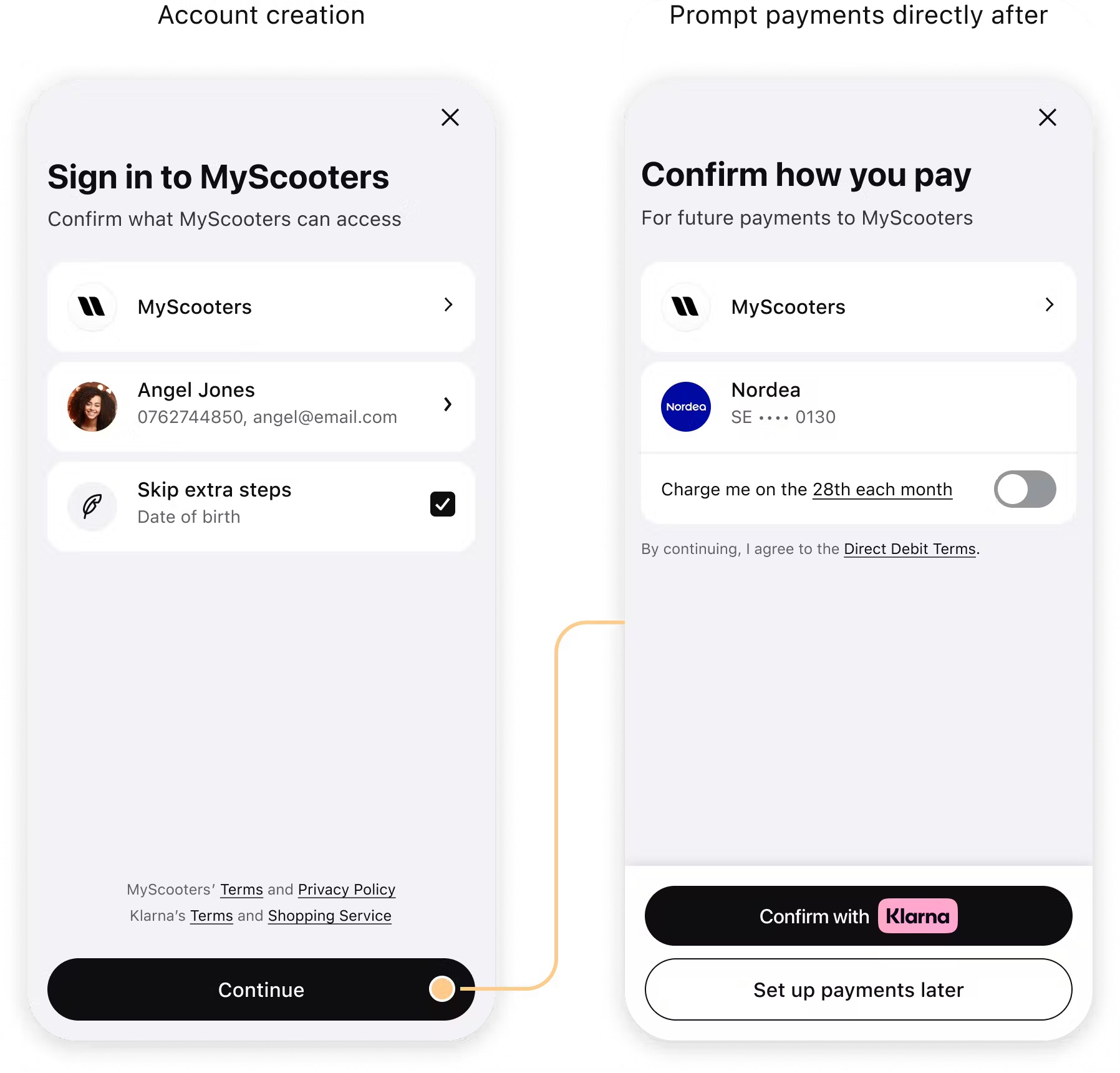
Example of on-demand flow.
Mobile SDK version support
The tokenized payment flow is supported in the Klarna Mobile SDK for:
- iOS: Version 2.6.23 and later
- Android: Version 2.6.21 and later
Make sure to request the correct scope for your use case:
| Use case | Scope |
|---|---|
| On-demand | payment:customer_present |
| Subscription | payment:customer_not_present |
JAVASCRIPT
1
2
3
4
5
const siwkButton = klarna.Identity.button({
scope: "profile:name profile:email payment:customer_present",
redirectUri: "http://localhost:3000/callback",
});
Web SDK
KlarnaSignInButton initializer has new argument of tokenizationDelegate to received the KlarnaSignInTokenizationDelegate instance.
Pass the KlarnaSignInTokenizationCallback instance into the KlarnaSignInButton constructor.
Mobile SDK
SWIFT
1
2
3
4
5
6
7
8
9
10
let signInButton = KlarnaSignInButton(clientId: clientID,
                                  scope: scope,
                                  market: market,
                                  locale: locale,
                                  presentationContext: self,
                                  theme: klarnaTheme,
                                  environment: env,
                                  region: reg,
                                  returnUrl: URL(string: "https://sneakers.com")!,
eventHandler: self,Handle the 
tokenizationTrigger event by making a call to the Klarna Payments API through your backend to create a new payment session.JAVASCRIPT
1
2
3
4
5
6
7
siwkButton.on("tokenizationTrigger", async (callback) => {
  const response = await fetch("https://merchant-backend.com/payment", {
    method: "POST",
  });
  callback(response.session_id)
});
Web SDK
The KlarnaSignInButton now has a new protocol called KlarnaSignInTokenizationDelegate that needs to be implemented. The delegate implementation must provide the tokenization ID to the completion handler in order to continue the flow.
The KlarnaSignInButton now has a new callback called KlarnaSignInTokenizationCallback that needs to be implemented. The callback implementation must provide the tokenization ID to the completion handler in order to continue the flow.
SWIFT
1
2
3
4
5
6
7
8
@available(iOS 13.0, *)
extension AnyKlarnaSignInTokenizationDelegateImpl: KlarnaSignInTokenizationDelegate {
func onTokenization(_ klarnaComponent: KlarnaComponent, completionHandler: @escaping (String) -> Void) {
let tokenizationId = ... // your implementation to get the tokenizationId here
completionHandler(tokenizationId)
}
}
When creating the payment session, remember to:
- Add the
intentastokenizeto trigger the tokenization flow. - Set up the authorization webhook in the
merchant_urlsobject. - Set
order_amountandorder_linesamount value to 0.
BASH
1
2
3
4
5
6
7
8
9
10
curl --request POST \
  --url https://api.klarna.com/payments/v1/sessions \
  --header 'Authorization: Basic token' \
  --header 'Content-Type: application/json' \
  --data '{
  "purchase_currency": "EUR",
  "order_amount": 0,
  "purchase_country": "DE",
  "order_lines": [
{Integration requirement
When offering on-demand services with Klarna, you must include the customer_tokens EMD package, to enable Klarna to perform accurate underwriting and fraud checks when the customer adds Klarna as a payment option for future on-demand payments.
After the customer consents to share their data, Klarna will automatically create an HPP session connected to the payment
session_id provided in the response of the create_session.You can read the tokens from the
signin event response, the id_token will contain requested customer data.The refresh_token
refresh_token can be used to fetch access token, allowing you to either retrieve customer data or log in customers during the purchase flow at a later time.JAVASCRIPT
1
2
3
4
5
6
7
siwkButton.on("signin", async (signinResponse) => {
  "user_account_linking": {
    "user_account_linking_refresh_token": string;
    "user_account_linking_id_token": string;
  }
});
You should receive the
authorization_token in a webhook to the URL that you provided in the create session call.After that, customer_token can be charged.
Jump to section...