

Integration steps
Native support for this feature is as easy as it gets by an actual native view supporting both iOS and Android.
2 min read
Your placement configurations enabled from the Merchant Portal will be available in your application instantly.
On-Site Messaging can present different placement configurations including but not limited to financing options, required purchase amount for better deals, monthly payment amount and legal obligations.
To achieve this functionality, the SDK provides 3 steps of integration:
- 1.Set Parameters
- 2.Invoke Render
- 3.Handle Render Result
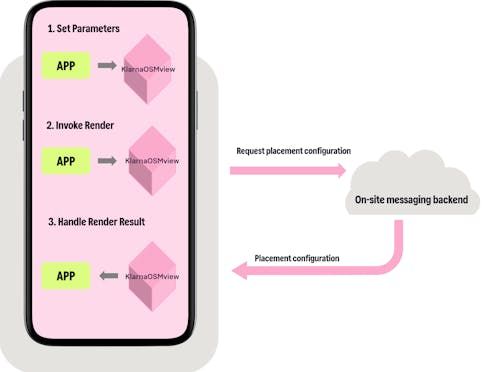
The native view has some set of parameters that the merchant needs to set before the render operation. Some of these parameters are merchant specific such as client identifier, placement keys, locale etc. but there are also parameters for cart or product based parameters such as purchase amount. With these options On-Site Messaging will provide users a unique placement configuration and provide a better purchasing experience.
Once these parameters are set all you need to do is call the render method of the native view. Then it will fetch the placement configuration from Klarna’s On-Site Messaging backend and render the views.
The native view will always return a render result. If the result is empty(without any errors) this means that the render was successful and the On-Site Messaging components are added inside the native view. But if there is an error that occurred during the process, the render result callback will be invoked with an error object describing the failure.
For further technical details and a guide to how to integrate for both platforms please refer to our iOS guide here and Android guide here.
Similar to other parts of the SDK, On-Site Messaging also uses a similar error properties:
| Property | Type | Description |
|---|---|---|
| name | String | Name of the error that occurred. Value of On-Site Messaging error names can be found inside our SDK. |
| message | String | Message describing the error. |
| isFatal | Boolean | Informs whether this error is fatal. If a fatal error occurs KlarnaOSMView should not be shown any further. |
Names of the errors and how to identify them are described in our iOS guide here and Android guide here.
Jump to section...