

Setup your app
In this step-by-step guide you will learn how to integrate Sign in with Klarna into your React Native app.
6 min read
If you want to add the SDK via
npm use the following to add library dependency:BASH
1
2
npm install react-native-klarna-inapp-sdk --save
If you are using yarn, then use the following to add library dependency:
SHELL
1
2
yarn add react-native-klarna-inapp-sdk
For installing native dependencies for iOS, go to your
ios directory and run pod install.To ensure the Sign in flow initiated by the SDK can correctly redirect back to your application, you must configure a unique return URL (deep link) for your app and provide this URL string to the SDK. This value is required specifically for the Sign in flow initiated by the SDK.
Important: This configuration is distinct from any other return URLs the SDK might require for handling redirects from external third-party applications. Ensure you are configuring the URL for the SDK's Sign in flow.
Add this snippet to your manifest file in order to set your return URL value for the SDK’s activity.
MARKUP
1
2
3
4
5
6
7
8
9
<activity android:name="com.klarna.mobile.sdk.activity.KlarnaRedirectReceiverActivity" android:exported="true" tools:node="replace">
   <intent-filter>
      <action android:name="android.intent.action.VIEW"/>
      <category android:name="android.intent.category.DEFAULT"/>
      <category android:name="android.intent.category.BROWSABLE"/>
      <data android:scheme="<YOUR-SCHEME>" android:host="<YOUR-HOST>"/>
   </intent-filter>
</activity>
Android SDK change
In version 2.6.11 and later, a new activity called
**KlarnaRedirectReceiverActivity** has been introduced in the Android SDK.Before starting to work with the Sign In With Klarna, the Android and iOS parts of your React Native app need to be updated in order to provide the best experience and functionality to the users. Please read and follow the
before you start -> setting the return url guide for Android and preparation guide for iOS.You just need to import the
KlarnaSignInSDK class from Klarna's React Native Mobile SDK as follows:TYPESCRIPT
1
2
import {KlarnaSignInSDK} from 'react-native-klarna-inapp-sdk';
To create an instance of
KlarnaSignInSDK you need to call the KlarnaSignInSDK.createInstance():TYPESCRIPT
1
2
3
4
5
6
7
8
9
10
KlarnaSignInSDK.createInstance({
environment: KlarnaEnvironment.Staging,
region: KlarnaRegion.EU,
returnUrl: 'myApp://signInWithKlarna',
})
.then(klarnaSignInInstance => {
console.log('KlarnaSignIn instance created: ', klarnaSignInInstance);
klarnaSignIn = klarnaSignInInstance
})
.catch(e => {If an instance of
KlarnaSignInSDK is initialized correctly, you will get a reference to it in the promise return value. If there is an error during initialization, it will be returned in the catch block of the promise.| NAME | TYPE | REQUIRED | DESCRIPTION |
|---|---|---|---|
environment | String | No | An enumeration that is used to configure the endpoints and other behaviours that the KlarnaSignIn will be operating with. The possible values are as follows. If not set, the default value will be production.
|
region | String | No | An enumeration that defines the regional API endpoints to which the KlarnaSignIn flow will send/receive requests. The possible values are as follows. If not set, the default value will be eu.
|
returnUrl | String | Yes | The URL you defined as your redirect URI for Sign in with Klarna integration in the preparation section. You can find more information about the URL in our iOS getting started guide and Android before you start guide. |
To start the sign in flow, you need to call the
signIn() function:TYPESCRIPT
1
2
klarnaSignIn.signIn(clientId, scope, market, locale, tokenizationId)
After calling the
signIn function, the sign in flow will be presented to the user. When the user finishes the sign in flow, you would either receive a successful or an error result in the promise returned by the signIn function.| PARAMETER | TYPE | REQUIRED | DESCRIPTION |
|---|---|---|---|
clientId | String | Yes | The UUID you get when creating your Klarna OAuth 2.0 app. |
scope | String | Yes | A space-separated list of scopes you would like to request from the user. |
market | String | Yes | The market or the country where this integration is available, for example, SE for Sweden. |
locale | String | Yes | The language to present to the user, for example, sv-SE or en-SE for Sweden. |
tokenizationId | String | No | The ID to enable tokenization. |
The table below lists the available scopes and how they correspond to claims and permissions.
| Scope | Claims | Type | Can be toggled off |
|---|---|---|---|
| profile:name | given_name | string | No |
| profile:name | family_name | string | No |
| profile:email | string (Email) | No | |
| profile:email | email_verified | boolean | |
| profile:phone | phone | string (E. 164) | No |
| profile:phone | phone_verified | boolean | |
| profile:date_of_birth | date_of_birth | string (ISO 8601) | Yes |
| profile:billing_address | street_address | string | Yes |
| profile:billing_address | street_address2 | string | |
| profile:billing_address | postal_code | string | |
| profile:billing_address | city | string | |
| profile:billing_address | region | string | |
| profile:billing_address | country | string (ISO 3166-1 alpha-2) | |
| profile:shipping_address | street_address | string | Yes |
| profile:shipping_address | street_address2 | string | |
| profile:shipping_address | postal_code | string | |
| profile:shipping_address | city | string | |
| profile:shipping_address | region | string | |
| profile:shipping_address | country | string (ISO 3166-1 alpha-2) | |
| profile:national_id | national_id | string | Yes |
| profile:country | country | string (ISO 3166-1 alpha-2) | Yes |
| profile:locale | locale | string (ISO 3166) | Yes |
| payment:consumer_present | trigger on-demand flow | N/A | N/A |
| payment:consumer_not_present | trigger subscription flow | N/A | N/A |
Required scopes
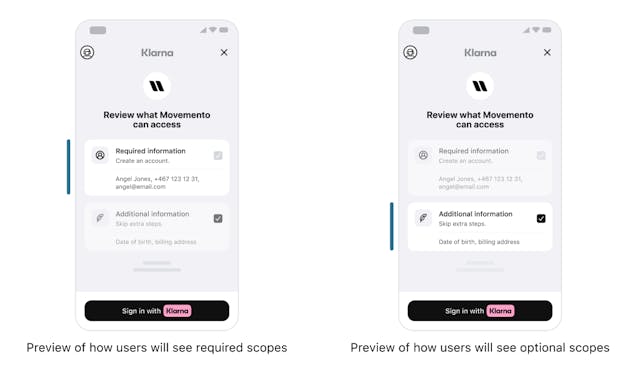
Remember to always add 'openid', 'offline_access' and 'payment:request:create' scopes to receive full functionality of Sign in with Klarna.
The mock-ups below show how users will see required versus optional scopes when entering the Sign in with Klarna flow.
There are two main action values to look for, KlarnaSignInUserCancelled triggered when the user cancelled the flow at any point and the KlarnaSignInToken event, received after the signIn process is completed. You can get the tokens from the
KlarnaProductEvent params for KlarnaSignInToken event and send it to your backend.TYPESCRIPT
1
2
3
4
5
6
7
8
9
10
klarnaSignIn
?.signIn(clientId, scope, market, locale, tokenizationId)
.then(r => {
switch (r.action) {
case 'KlarnaSignInUserCancelled':
console.log('User cancelled sign in');
break;
case 'KlarnaSignInToken':
console.log('Token event received: ', r);
// Access tokenWhen the
signIn method resolves, a KlarnaProductEvent is returned as a result.
This event type includes three properties, action, params and sessionId.| NAME | TYPE | DESCRIPTION |
|---|---|---|
action | String | Represents the name of the event. |
params | String | Contains a payload that may or may not be returned, depending on the specific event. |
sessionId | String | An identifier that can be useful when contacting Klarna for support. |
After the flow is complete and the token has been retrieved and you no longer need the
KlarnaSignInSDK instance, you can call the dispose() method to release the resources used by the object.TYPESCRIPT
1
2
klarnaSignIn?.dispose();
Jump to section...