

Redirection - eCommerce
After creating an HPP Session, share it with customers based on the use case (eCommerce, In-store, Telesales) via direct redirection or advanced distribution methods.
7 min read
After creating the HPP Session, it will be necessary to get the customer to access it so that they can complete the payment. This distribution of the HPP Session will change depending on the use case you are trying to achieve.
Technical constraints are defined by the use case (eCommerce, In-store, or Telesales) and would most likely be covered by these cases:
- 1.The Consumer is already on a website that you own. You are able to redirect their browser to the Hosted Payment Page. This use case is the easiest to fulfill and you can directly read our chapter on Redirection. Usually, this means that you are in a regular eCommerce setup where the customer goes through a Checkout experience.
- 2.The Consumer is interacting with your system indirectly, for example, a phone call, SMS, or an email. In all of these cases, you will need to get the customer to use a web browser to actually access the Hosted Payment Page, and for that, you can use our advanced distribution mechanisms.
- 3.The Consumer is interacting with your system using a shared device, for example, a Kiosk in a store. As Privacy standards are not met, it is also required to use advanced distribution mechanisms.
Ecommerce redirection flow
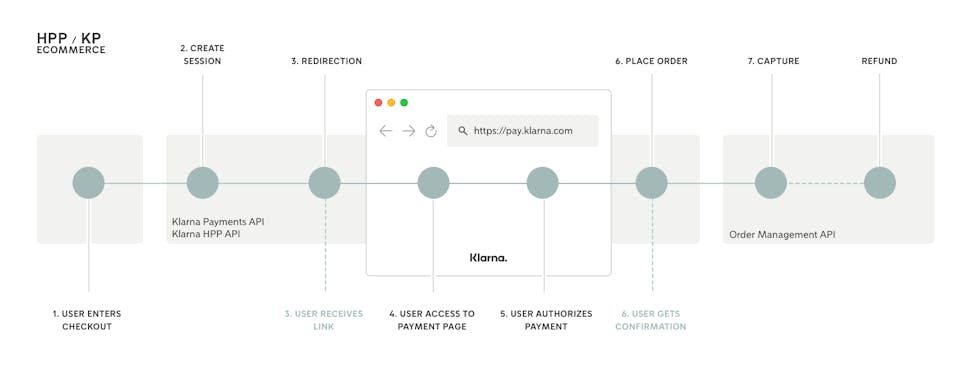
eCommerce Flow of HPP with Klarna Payments
When creating the HPP Session you get back a redirection_url that can be used by a customer to access the Payment Page. You just need to redirect the customer to this URL.
If you expect the customer to be redirected to your own website after completing the payment, or by going back or cancelling, you will need to pass in Merchant URLs in the Create Session call.
This distribution mechanism is usually used in an eCommerce ecosystem and is not really adapted to In-store or Telesales.
Please be aware that redirection is not always guaranteed. For example, when customer closes HPP window before redirection happened. This means that as soon as place_order/capture_order mode is used it is advised to keep track of the HPP session status by polling an HPP's read endpoint or via callback mechanism.
| Name | Usage |
|---|---|
| success | Customer will get redirected there after a successful authorization of payment. Customer may have seen a confirmation from Klarna before getting redirected, but it is mandatory that the integrator displays information about the payment that has just been authorized. |
| failure | Customer will get redirected there when payment was refused by Klarna. If an error occurs and no error URL was given, then the customer will also get redirected to this URL. They will have seen a message explaining the reasons for a decline from Klarna beforehand. |
| back | Customer will get redirected there when clicking on the back button. This URL is recommended in an eCommerce flow and any cancel will be treated as abackURL. When customers get redirected to the back URL, they can still access to the Payment Page, meaning that it is up to the integrator to actually disable the session if needed. This URL may be used by the customer to correct any information that was wrongly formatted (ex: date of birth). |
| cancel | Customer will get redirected there when clicking on the cancellation button. This URL can't be used in an eCommerce flow and will be considered as a back URL, meaning that the session won't be cancelled. See back button versus cancel button chapter. |
| error | Customer will get redirected there when an error occurred in the flow. If this parameter is not set and a failure URL is present, the customer will get redirected to the failure one and the integrator won't be able to tell the difference between an error and a decline. |
Cancel and Back - what are the differences
It is not possible to use both back and cancel options simultaneously, because the user interface will be adapted to use one of them:
- When customer has a back button on the page, then the Payment Page is still reachable after clicking on the button. It means that they can come back with their browser, or that you can redirect them back to the same redirect_url without changing anything.
- When customer has a cancel button on the page, they will get prompted to validate that they want to actually cancel the payment. If they do so, then the HPP Session will now be in a CANCELLED state and the customer won't be able to interact with the payment anymore.
You can find out more on the difference between the IN_PROGRESS and CANCELLED states on our guide to track the HPP session status.
When on eCommerce, the value for the cancel URL is systematically considered as a back URL and customers will always be able to go back to the Payment Page.
Distribution to customer device - In-store, Telesales
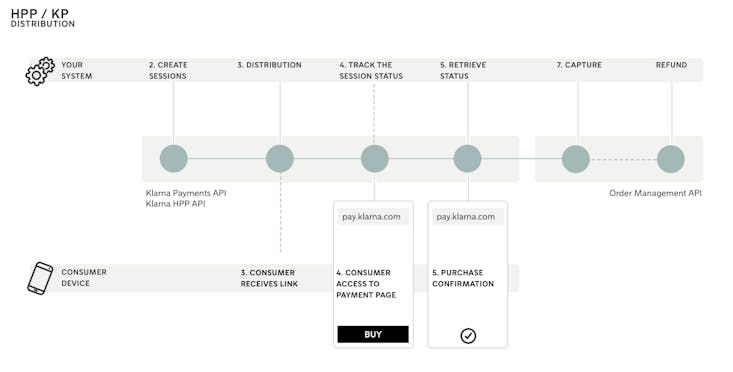
eCommerce Flow of HPP with Klarna Payments
With the HPP API you can create payment flows that are asynchronous or where you don't own any website, for example for an In-store payment. You will be able to send Payment Requests to customers by e-mail or letting them read a QR code displayed on a screen. Depending on the use case and whether it is programmatically driven or human driven, you may choose to integrate with our distribution APIs or using our Distribution Module.
Distribution Module
The Distribution Module is the recommended way to create flows where payment links are distributed by an operator. An operator can be a store associate, a telesales person or the customers themselves. This user interface is future proof and will let Klarna optimize for the smooothest experience.
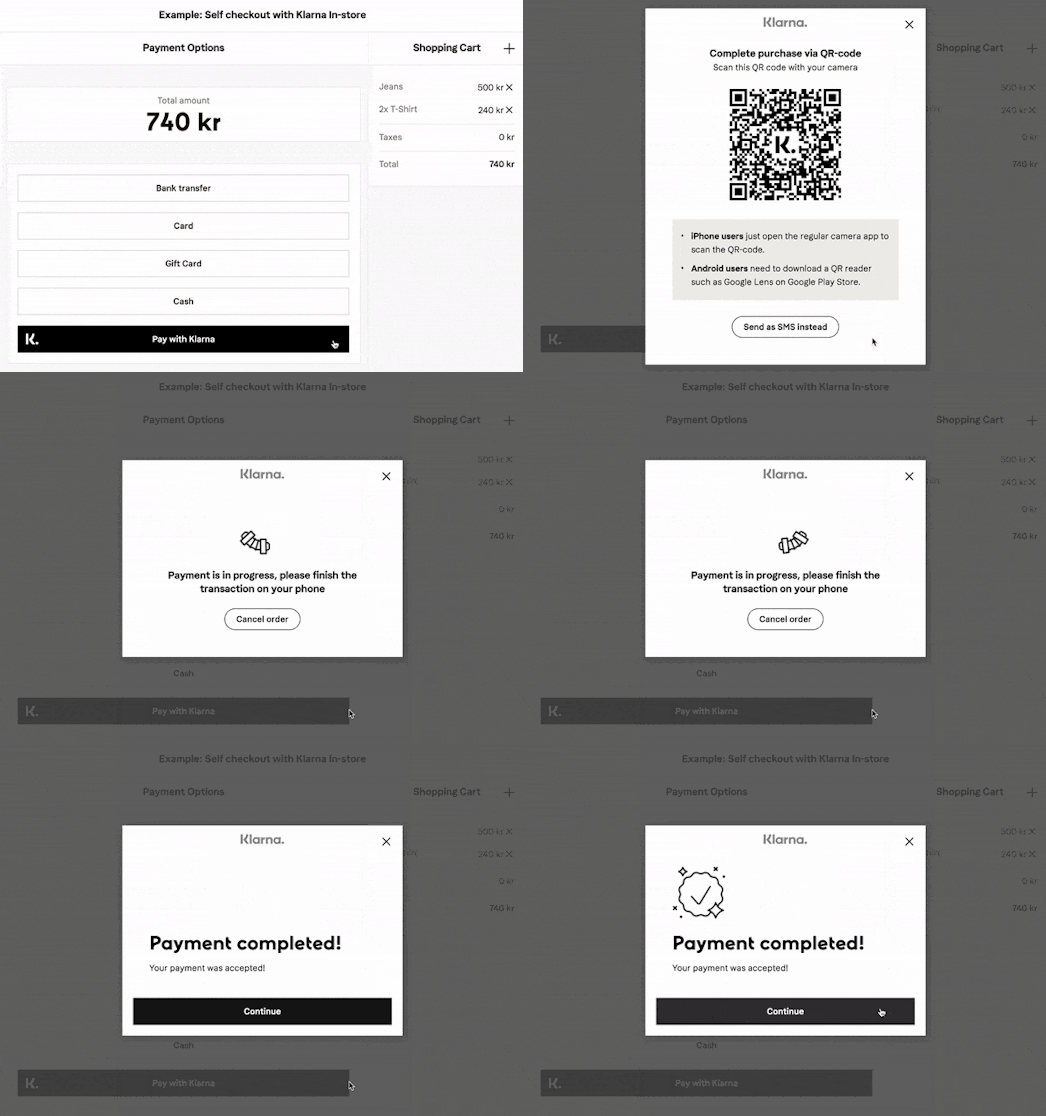
Video of a Self Checkout integration
This interface implements all the best practices to get the link delivered to the end customer the fastest possible. It supports an interface for a seller (staff, sale associate, clerk) as well as one that is directed to the customer themselves in a self-checkout context.
After the integration, you will be able to update the features of the interface without making any changes to your code using our profiles mechanism. All it requires is a web application or an application capable of displaying web pages.
[ Read our integration guide for the Distribution Module]→
Distribution using APIs - Automated payment flows
For integrations where payment links are sent automatically, or legacy systems that can't open any web page, you can integrate with our APIs directly.
Use the distribution endpoint if you want to distribute to the customer a link to the Hosted Payment Page either by e-mail. A message will be sent directly to the customer and will be localised to the customer's language, it will contain a link. When using the link, the customer will see the specific Hosted Payment Page. The phone number or e-mail address will be used by Klarna to try to pre-fill the customer if they already used Klarna before and agreed to be pre-filled, which will increase the speed of the payment.
QR Code
A qr_code_url is provided back in the creation call of the HPP Session, this URL is a public URL that can be displayed on every browser and doesn't need any authentication.
You can embedded this picture in a display that can be seen by the customer, who would be able for example to read the QR Code using they mobile phone. The link embedded in the QR Code is leading to the Payment Page of the HPP Session. They will then be able to proceed to payment.

QR code leading to the Hosted Payment Page
Jump to section...